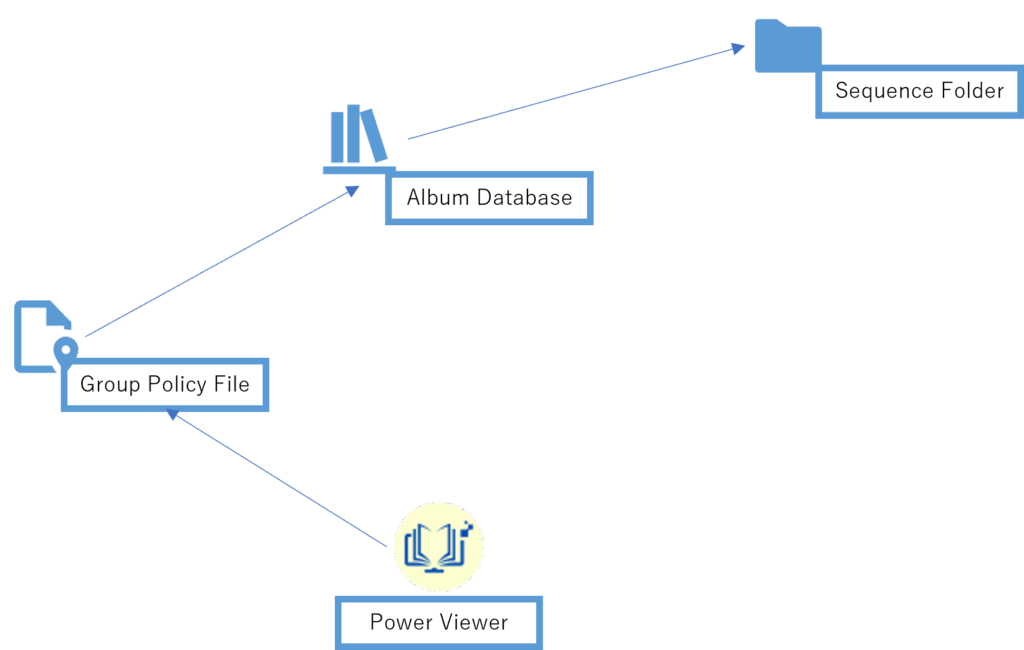
The relationship between the Group Policy File, Album Database, and eCTD Storage can be illustrated as follows:
Power Viewer
The application. Stores the path to the Group Policy File during initial setup.
Group Policy File
A file that contains company-specific settings. Can record the paths of multiple Album Databases.
Album Database
The central database for managing eCTD.
Sequence Folder
The folder where the actual eCTD files are stored.
→ (Arrow)
Indicates that “the previous element remembers or references the path of the next element.”
Placement Constraints
Group Policy File
Must be located in a local environment.
It is recommended to place it on an internal shared server. However, since the data is not frequently updated, the following approaches are also practical:
Place the file on cloud storage and share it via Explorer sync features
The administrator creates the file and distributes it to employees, who then place it on their own PCs (e.g., desktop)
Album Database
There are two options: Local environment or Azure DB.
Azure DB is not yet implemented as of v2.0.9.
Recommended
Album Database【Overview】 This setting relates to GroupPolicy.Multiple Album Database configurations can be stored within a single GroupPolicy. If multiple configurations…
Sequence Folder
Can be selected from either a local environment or cloud storage.
Recommended
eCTD Storage【Overview】 Manage eCTD Storage settings. To add a SubmissionUnit, you must first register an eCTD Storage configuration that contains that SubmissionUnit.F…