
TOC
Overview
For eCTDs in a local environment (accessible in Explorer view), you can open them directly without registering them in the database.
Specify the sequence folder (the folder containing submissionunit.xml or index.xml), and select the desired Application from the list extracted by Power Viewer to open it.
Screen Layout
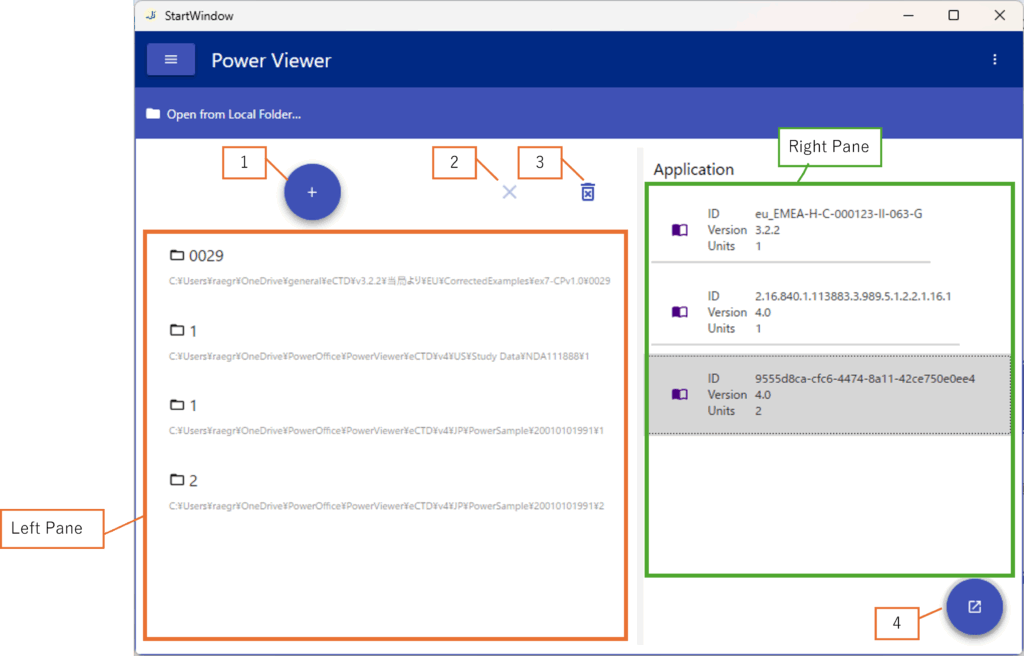
| No. | Description |
|---|---|
| 1 | Select a Sequence Folder and add it to the Left Pane |
| 2 | Remove the selected folder from the Left Pane |
| 3 | Remove all folders from the Left Pane |
| 4 | Open the Application selected in the Right Pane |
| Left Pane | Displays a list of added Sequence Folders |
| Right Pane | Displays a list of extracted Applications |