
Overview
The CTD Tree Tab is the primary screen for viewing eCTD v3.2.2.
Select the Leaf, etc., you want to view on the left, and browse its information on the right.
Screen Layout
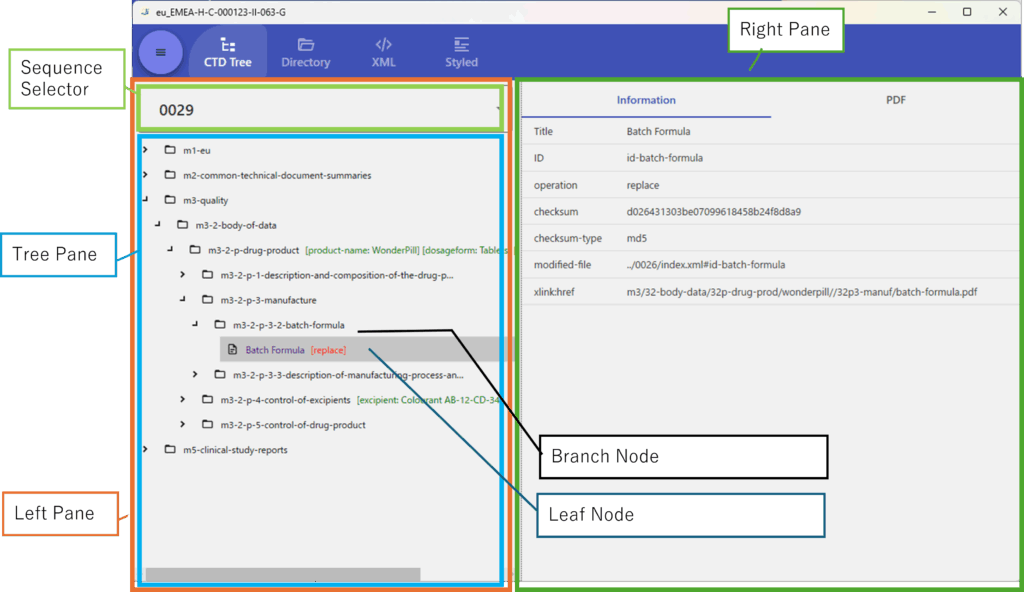
- Left Pane
-
The area on the left.
Contains the Sequence Selector, Current–Delta Switch, and the Tree Pane.
- Sequence Selector
-
Select the Sequence to view in this tab. It is a dropdown list.
- Tree Pane
-
Displays the Leaves, etc., of the selected Sequence in a tree structure.
- Right Pane
-
Shows information for the item selected in the Left Pane.
- Leaf Node
-
A Node that represents a Leaf.
- Branch Node
-
A Node required to arrange Leaves within the CTD Tree structure.
Selecting the Sequence to View
Select the Sequence you want to view from the Sequence Selector.
All Sequences belonging to the Application currently being viewed are listed in the combo box, so choose one from the list.
Tree Pane
The top level of the tree consists of Branch Nodes for M1, M2, M3, M4, and M5, with Leaf Nodes at the lowest level.
Each Leaf Node always belongs to a Branch Node.
Leaf Node
Each Leaf Node corresponds to one Leaf.
When selected, information for the corresponding Leaf is shown in the Right Pane.
Branch Node
When selected, the Right Pane shows the combined information for all Leaf Nodes under that Node.
Right Pane
Leaf
If the file referenced by the selected Leaf Node is a PDF, the PDF Tab appears; if it is XML, the XML Tab appears.
The PDF Viewer setting is applied to the PDF rendering engine used in this PDF Tab.
